Toca Boca Hair Salon 4
- 3.8
- Rating
- 50.00M
- Installs
- Free
- Price
 Analysis by App-foxy
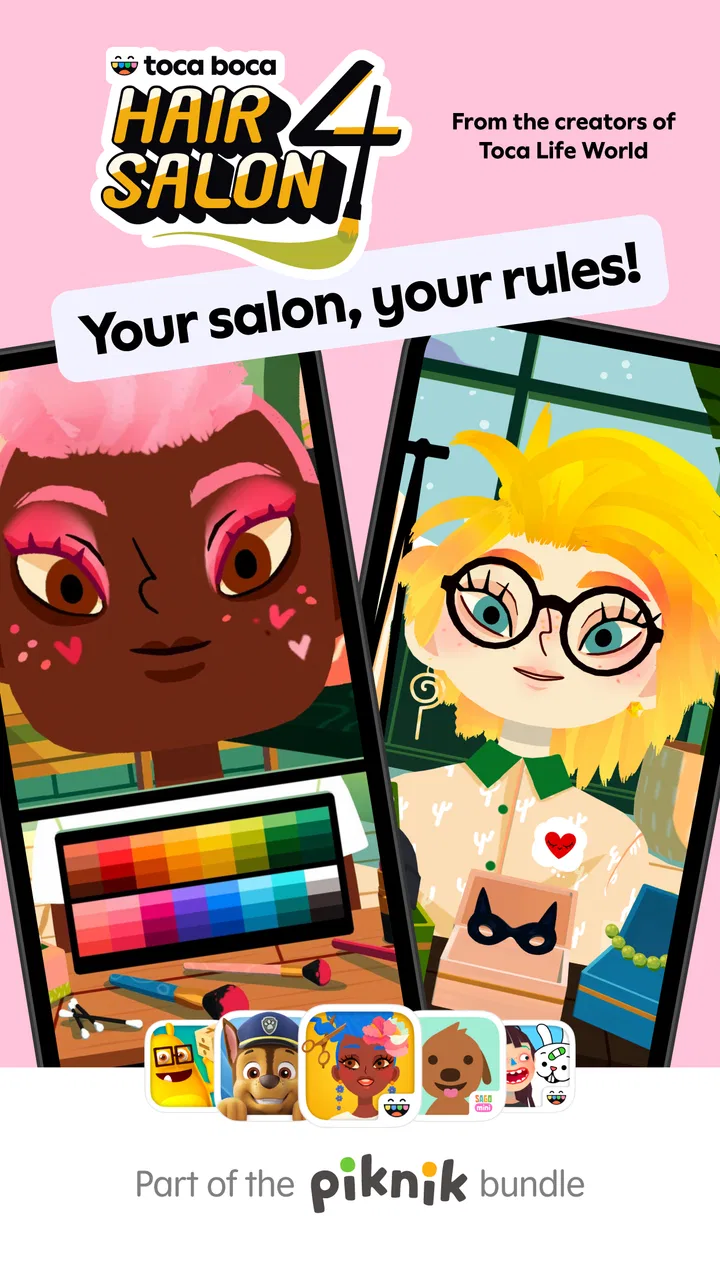
I spent time with Toca Boca Hair Salon 4 as a relaxed, child-friendly styling game, and its appeal is easy to understand: it turns hairdressing into an open-ended activity rather than a test with a correct answer. You choose a character, experiment with a look, and keep changing it until the result feels right. That simple loop makes it inviting for children who enjoy creative play, while also giving parents a calmer alternative to games built around competition, timers, or difficult objectives.
Play Piknik is the developer behind this educational game, which is available for free and is rated for Everyone. It has reached over 50 million installs, with an average rating of 3.7 from around 165 thousand ratings and roughly 7 thousand written reviews. Those figures suggest a very broad audience, although the middle-of-the-road rating also tells me that it will not suit every family equally well. The experience is deliberately focused, and that is both its strength and its main limitation.
How the salon experience feels in everyday use
The first thing I noticed is that the game does not ask me to learn a complicated rule set before I can start. The central idea is immediately understandable: create a style, look at the result, and try something else. That makes it suitable for a child who wants to play independently but may not yet be comfortable with reading-heavy instructions. It also works well as a shared activity, because an adult can suggest a theme while the child makes the decisions.
You May Also Like

 AccuWeather: Weather Radar
AccuWeather Review: A Quick, Clear Forecast for Everyday Decisions
For everyday plans, the best forecast is the one you can understand quickly. AccuWeather makes rain timing, radar, and local conditions easy to act on, with a few trade-offs.

 Hill Climb Racing
Why Hill Climb Racing Still Turns Crashes Into One More Run
A tiny car, a bumpy hill and one more upgrade: Hill Climb Racing keeps resurfacing because its simple chaos makes every near-miss feel personal.

 AliExpress - Shopping App
AliExpress Makes Global Shopping Feel Personal, but Shoppers Bear the Risk
AliExpress turns a global marketplace into a pocket-sized discovery engine. Its reach is useful, its shopping loop compelling, and its trade-offs easy to miss.

 Lords Mobile: Kingdom Wars
Lords Mobile Is a Kingdom-Building Routine, Not a Quick Match
A case-by-case verdict on the building, battles, device demands, and social commitments that make Lords Mobile rewarding for some players and exhausting for others.

 PDF Scanner app - TapScanner
TapScanner Makes Paperwork Easier to Capture, Check, and Share
TapScanner makes scanning with a phone feel less like a rescue operation and more like a dependable step in getting work done. Its capture tools are useful, though not flawless.

 Block Blast!
 Shows How Much a Puzzle Game Can Leave Out
A quiet grid game shows why puzzle players increasingly value instant clarity, repeatable skill and low-pressure play—and where the genre still needs to catch up.
More From Our News Desk
View All News


A realistic use case is a short creative break after school. A child can sit down, make a deliberately unusual hairstyle, show it to a parent, and then start over with a completely different idea. There is no need to prepare a long session or remember a complicated story. I found that this kind of open play is more useful when the child is allowed to explore rather than being pushed toward a polished result.
The educational value is informal rather than academic. It encourages choices, visual comparison, sequencing, and a basic understanding of how small changes affect an overall appearance. I would not choose it as a substitute for a structured learning app, but I can see why it belongs in the educational category. The learning comes through experimentation, patience, and creative decision-making rather than lessons or quizzes.
Why the low-pressure design matters
Many children’s games use rewards, levels, or challenges to keep attention. This one is more appealing if your child prefers making things to winning things. I liked that the activity can be treated as a miniature design workspace: start with an idea, adjust it, inspect it, and revise it. That process gives children room to develop a personal sense of style instead of simply copying a target image.
There is a useful trade-off here. The lack of pressure makes the game approachable, but it can also make the experience feel aimless to a child who needs clear goals. If your child regularly asks what to do next, a puzzle game with stages or a guided creative app may hold attention better. This salon is strongest when the player enjoys deciding the direction of play.
I also think the game works best when adults resist taking over. It is tempting to suggest the “best” colour or fix a look that seems messy, but the messy result is often where the child is testing an idea. A better approach is to ask what they were trying to create and let them decide whether to keep it. That turns a few minutes of tapping into a more meaningful creative conversation.
What happens during longer or more active sessions
In light use, the experience feels like the kind of game I could open for a quick session without a long preparation period. The interaction is built around visual changes, so the player’s attention stays on the character and the developing style rather than on menus or text. That makes it especially suitable for younger users who may lose interest when an app spends too much time explaining itself.
Heavier use is different. A child who keeps changing a look repeatedly is asking the device to refresh the visual scene over and over, and older or less capable hardware may feel less immediate than a newer phone or tablet. I would not describe that as a confirmed problem on every device, but it is the practical point I would watch first: repeated styling, fast changes, and long sessions are more demanding than simply opening the game and making one design.
The current version is 3.1. I would keep the app updated when an update is available, especially on a shared family device, because current software is generally the sensible starting point when checking stability. Still, an update number alone does not tell me how the game will behave on every model. Performance depends on the device, its available storage, background activity, and the age of the operating system.
One non-obvious tip is to treat the game as a short creative station rather than an app that needs to run continuously. If the device begins to feel warm, animations seem less responsive, or switching away and back becomes awkward, saving the child’s work in a simple family routine—show the result, then close the game—can make the experience feel more dependable. This is not a special feature; it is a practical way to reduce unnecessary strain during repeated play.
Stability and recovering from interruptions
For a child’s app, recovery matters almost as much as speed. Young players may accidentally switch applications, lock the screen, or hand the device to someone else without explaining what happened. I found the most reassuring approach is to test the game during the first few sessions with an adult nearby: open it, make a style, leave briefly, return, and see whether the child understands where to continue.
I would not promise that every session will recover identically on every phone. Operating-system behaviour, memory pressure, and other open apps can affect what happens after an interruption. If the device is shared with video, messaging, or several games, closing unused apps before handing it to a child is a sensible habit. It reduces the chance that the salon has to compete for limited resources.
The game’s simple premise helps reliability in one important way: there is less story progress or complicated mission structure for a child to lose track of. If a session ends unexpectedly, the emotional cost may be lower than in a game where a long challenge or level has been completed. That does not remove the frustration of losing a creative result, so I would still avoid treating it as a place for a child to work on something they cannot easily recreate.
Another useful workflow is to make the first design together and then let the child repeat the process alone. This serves two purposes. It teaches the controls without turning the session into a lesson, and it gives you an early impression of how the app behaves on your particular device. If the game feels smooth with one user and a clean device, you have a better baseline for judging later slowdowns.
Device fit, operating system, and resource expectations
The minimum operating system is Android 7.0, so compatibility is not limited to only the newest Android devices. That said, compatibility and comfort are not identical. A phone may be able to install the game while still offering a less pleasant experience if it has limited memory, little free storage, or many background tasks running.
I would choose a tablet when the main player is a young child and one is available. A larger screen gives more room for visual choices and makes shared play easier, particularly when a parent is helping without holding the device directly in front of the child. A phone is more convenient for travel, but the smaller display can make a creative activity feel cramped, especially when several people are looking at the result.
Before installing, I would check three practical things: whether the device has enough free space for normal operation, whether its system is at least Android 7.0, and whether battery-saving or performance-restricting modes are active. These are ordinary checks, but they matter more for a visual game than the install process alone suggests. A child is likely to judge the whole experience by how quickly a change appears, not by whether the app technically opened.
The game is free to download, but it includes in-app purchases ranging from $0.99 to $79.99 per item. That is important for families sharing a device. I would review purchase controls before handing the phone or tablet to a child, and I would explain clearly which parts are available without spending money. The free entry makes it easy to try, while the broad purchase range means adults should not assume that “free” automatically means there is no buying decision to manage.
Resource demands are best understood in context. This is not the sort of app I would select for a device that already struggles with basic interaction, but it also is not an obvious choice for a high-end gaming setup. Its value is in the creative activity, not in pushing hardware to its limits. If your device is old enough that ordinary touch response already feels delayed, I would choose a lighter app or a physical styling toy instead.
Where it compares well, and where alternatives win
Compared with a structured educational app, the salon offers more freedom and less academic direction. A reading, maths, or language app is better when you want measurable practice and a clear learning path. Here, the child learns by trying combinations and making visual judgements. I prefer it for imaginative downtime, not for a planned study period.
Compared with competitive games, it is gentler. There is no need to beat another player or react under pressure, which makes it a reasonable option for a child who becomes discouraged by failure screens. The downside is that children who enjoy goals, scores, and visible progression may find it less motivating than a game designed around achievements.
Compared with a drawing app, the salon gives the child a narrower creative frame. That limitation can be helpful: the child does not face a blank canvas and wonder where to begin. On the other hand, a drawing tool offers more room for storytelling and independent expression. I would choose the salon for a child interested in appearance and transformation, while a drawing app may be better for a child who wants to create scenes, characters, or pictures from scratch.
Compared with a real salon role-play session using toys, this game is quicker to reset and easier to use in a small space. A physical activity may offer richer tactile play, though, and it does not depend on battery life or device performance. The best choice depends on whether convenience and repeatable digital experimentation matter more than hands-on materials.
Who will enjoy it, and who should skip it
I would recommend it to children who like styling, visual makeovers, character play, and trying unusual combinations without being told that one answer is correct. It is also a good candidate for parents looking for a calm shared activity that can last a few minutes or expand into a longer creative session. The Everyone rating supports its broad family positioning, but an age label cannot predict whether a particular child will enjoy an open-ended format.
I would be more cautious if your child needs a clear objective every time they play. The absence of a strong challenge structure can feel liberating to one player and empty to another. I would also skip it as a primary choice if your goal is formal education, deep progression, multiplayer competition, or a demanding technical showcase.
Parents should also consider the purchase setup. Because individual in-app purchases can reach $79.99, I would not leave a shared device unattended with purchasing access enabled. That is not a criticism of the styling activity itself; it is simply part of using a free-to-start children’s game responsibly. Establishing the rule before play prevents an otherwise enjoyable session from becoming a conversation about an unexpected purchase.
My performance verdict after weighing the trade-offs
My overall impression is that this is a focused, approachable creative game whose performance expectations should remain modest and realistic. It is designed around visual experimentation, so responsiveness matters, but the experience does not need the kind of intense speed associated with action games. On a reasonably maintained compatible device, I would expect it to be most comfortable in short or medium sessions, with longer repeated play providing the better test of heat, battery use, and responsiveness.
The strongest practical advantage is the combination of immediate play and low pressure. A child can begin without mastering a tutorial, make a choice, reconsider it, and build another look. The most important weakness is equally clear: the freedom may not provide enough direction for children who want missions or rewards, and device limitations can become noticeable when the game is used heavily on older hardware.
My recommendation is to try it as a supervised, creative break rather than treating it as an all-purpose learning game. Check the Android requirement, prepare the device by closing unnecessary apps, and set purchase protections before the first session. If your child enjoys experimenting with styles and you want a quieter alternative to competitive play, Play Piknik’s salon is worth trying. If you need structured lessons, deep progression, or guaranteed comfort on an aging device, another category of app will serve you better.
For me, the game succeeds because it understands the pleasure of changing one small detail and seeing a new result. It does not need to be bigger or more complicated than that. As long as the player enjoys open-ended styling and the device is in reasonable shape, Toca Boca Hair Salon 4 offers a friendly way to create, adjust, and start again.
FAQs for Toca Boca Hair Salon 4
01What age group is Toca Boca Hair Salon 4 suitable for?
Toca Boca Hair Salon 4 is designed for children aged 6 to 12, but it can be enjoyed by anyone who loves creative play. The game encourages imagination and creativity, offering a safe environment without in-app purchases or third-party advertising, making it ideal for younger users.
02Does Toca Boca Hair Salon 4 require an internet connection to play?
No, Toca Boca Hair Salon 4 does not require an internet connection to play. Once downloaded, all features are accessible offline, allowing users to enjoy the game without worrying about connectivity issues, making it perfect for travel or areas with limited internet access.
03Are there any in-app purchases in Toca Boca Hair Salon 4?
Toca Boca Hair Salon 4 offers a premium experience without in-app purchases. The game provides a complete set of tools and features from the start, ensuring that children can enjoy all functionalities without additional costs, which gives parents peace of mind.
04What kinds of hairstyles can I create in Toca Boca Hair Salon 4?
In Toca Boca Hair Salon 4, you can create an endless variety of hairstyles. The game includes a wide range of tools such as scissors, combs, and hair dye, allowing users to cut, style, and color hair in imaginative ways. The possibilities are limited only by your creativity.
05Is Toca Boca Hair Salon 4 safe for kids?
Yes, Toca Boca Hair Salon 4 is safe for kids. The app is designed with child safety in mind, featuring no third-party advertising or in-app purchases. It also adheres to COPPA standards, ensuring a secure and enjoyable experience for young players.
Pros
- Intuitive and engaging interface.
- Diverse range of styling tools.
- Encourages creativity in children.
- Regular updates with new content.
- No in-app purchases needed.
Cons
- Limited hairstyles available.
- Requires internet for updates.
- May lag on older devices.
- Occasional ad interruptions.
- Customization options can be overwhelming.

Toca Boca Hair Salon 4
Gallery